

Looking for an affordable way to improve user engagement with your firm’s website? Email marketing may be the answer.
There’s a reason that email marketing has been around for decades. It’s an affordable, reasonably low-effort, effective way of getting clients to engage with your content. That was true over 40 years ago when Digital Equipment Corp. sent the very first mass email campaign to 400 recipients, and it remains true to this day.
What is Email Marketing for Law Firms?
Think about it like this: Email marketing is like a fishing net, lying in wait in the water to catch potential clients. With the right bait (content) and a well-crafted net (email), you can reel these clients in!
Attorneys have a lot on their plates. When they’re handling a full caseload, attracting new clients often falls by the wayside. However, when lawyers fail to market themselves, it may become difficult to find leads and bring in new cases. And a lack of cases will ultimately affect their bottom line. Here, we will answer the question most lawyers have, can law firms market via email? An email marketing strategy can let the public know about the legal services you offer, maintain a clear line of communication and give you an edge over the competition. A simple email every so often can help your firm stay at the top of peoples’ minds so that if they need an attorney in the future, they know who to call.
Reasons Why Law Firms Should use Email Marketing
There are plenty of great reasons why law firms should use email marketing. As mentioned above, email makes it easy to contact a lot of people with a few simple clicks. And even if you’re only attracting a few new clients with each email, you’re still getting a huge return on investment. That ROI is why so many lawyers are beginning to see the benefits of email marketing. You can send emails to existing clients, prospects, and colleagues, which can help to build your word-of-mouth network as well.
When someone is searching for an attorney, they are looking for an experienced, knowledgeable, and compassionate professional. With email marketing, you can send out helpful, educational content and build your brand as a trustworthy lawyer. Your emails can:
- Link back to blog posts that you wrote to drive more traffic to your website.
- Provide answers to frequently asked questions.
- Promote events within your local community.
- Provide news about what’s going on at your firm.
- Spotlight an attorney or other member of your team.
Email marketing software for Law firms
And another benefit of email marketing is that it’s simple. Many of the big names in email marketing software, like MailChimp and Constant Contact, offer free subscription levels, so you can give their services a try. They allow you to build an email with one of their pre-designed templates and will track stats like how many people opened your message, and what links they clicked. This provides insight moving forward, as you’ll have a better idea of what types of communication your constituents respond best to.
Why invest in email marketing?
Did you know that for every $1 spent on email marketing, the average return on investment (ROI) is $44.25?
In other words, if a law firm invests $1,000 in email marketing, they could potentially generate $44,250 in revenue as a result of their email campaigns. This demonstrates that email marketing has the potential to generate significant revenue for businesses, including law firms.

Still not convinced about email marketing’s effectiveness? Here are some other reasons you should consider investing in email marketing:
- It allows you to reach a large audience quickly and cost-effectively
- It’s also highly customizable, allowing firms to personalize messages to specific groups of clients or potential clients.
- Its success is trackable, allowing firms to measure and analyze campaign success and adjust strategies as needed. By analyzing metrics such as open rates, click-through rates, and conversion rates, law firms can optimize their campaigns and ensure they are resonating with their audience.
Email marketing Best Practices
Personalize your emails
Each member of your target audience might be getting over 100 emails a day. So, how do you get them to open your email?
One word: personalization.
Studies have shown that personalized emails have a 29% higher open rate and 41% higher click-through rate than emails without personalization.

There are a number of ways to personalize your content, including:
- Addressing your recipient by their first name: This may seem like a small detail, but it can make a big difference in how your message is received.
- Segmenting your email list: Did you know that you can segment your firm’s email list based on factors such as location, industry, or interests? This allows you to tailor your messaging to each specific group, making it more relevant to their needs and interests. For instance, if you are a law firm with offices in multiple cities, you can send targeted emails to recipients in each city with information about local events or legal developments.
- Tailoring email content based on a user’s behavior: For instance, if a recipient has previously clicked on links related to family law, you could tailor the email marketing content to show them more information about your family law services.
Above the Fold
We know the phrase that goes, “don’t judge a book by its cover”, but let’s rethink this concept.
When it comes to marketing like email marketing, we do judge a book by its cover. The cover of this proverbial book is where law firms grab users’ attention.
Within email marketing, as well as website designs, there is a concept known as above the fold. It refers to the website or email that being visible when the user first opens the page without having to scroll down. This concept evolved with the birth of print media and the way newspapers were, and still are, read. (It dates way back to the 1700s!) Incredible, isn’t it?
Although it was a rule of thumb to always place the centerpiece content above the fold (digitally speaking), in today’s world it carries a heated argument in regards to its functionality. So, how exactly does the above-the-fold content placement work? And is it really still relevant? Is it applicable to law firms?
Stay with us as we uncover pros and cons, fun facts, tips, and tricks for above the fold.
Pique your visitors’ curiosity

We’ve mentioned that the concept of “above the fold” dates back to the 1700s. The reason is that the entirety of the printed newspaper was too large for a newspaper stand, so the paper was folded in such a way that the front page was split in half. Because of this, the concept of above the fold and below the fold emerged.
Still to this day, if you decide to buy a printed newspaper you’ll notice the upper half is where the attention grabbers, shocking headlines and initial interest takes place.
The same concept can be applied to digital media. In the realm of email marketing and websites, above the fold is considered the visible section without the need to scroll.
Before a user decides to scroll (or exit), it is crucial to grab the user’s attention… and this usually proves to be easier said than done.
According to Tribute Media, the current human attention span is shorter than a goldfish’s. We have an attention span of 6-8 seconds while a goldfish has an attention span of a whopping 9 seconds. (So, our ADD is up to 30% worse than a goldfish’s. Isn’t that mind-blowing?!) Digital-first impressions clearly require a lot of work in sight of this. OptiMonk states that whatever you place above the fold does matter.
OptiMonk argues that content placement above the fold optimization should be part of content marketing. To do so law firms can:
- Optimize a responsive design – if a website and email look great users want to stay for longer periods of time, interact and purchase more. (For law firms, it could mean calls and cases).
- Add Calls to Action at the beginning – Powerful CTAs can directly impact conversions.
- Place the important content first – Headlines, calls-to-action, other vital information should be the first thing a user reads.
OptiMonk argues that if the user is not initially intrigued, they will leave and find someone else.
While all of this may be relevant, others argue the contrary. Let’s look into that…
“In Your Face” Sales and Marketing Can Be Too Much
On the other hand, the counterargument is that above the fold is now outdated because it is too much of a “in your face” sales approach.
Users online are very different from users in the 90s and early 2000s. Before, the internet was evolving. Now, the internet is intuitive. Let’s face it, in this day and age, even babies can scroll without giving it a second thought. The big difference between then and now is that back then information was limited. Now? It’s the opposite! We have too much information that is readily available.
For this reason, VWO argues that not all the necessary information has to be above the fold. To support this argument, they add:
- Users are familiar with scrolling. Users already expect information below the fold.
- There are a lot more mobile users than desktop users according to Perficient. This means it’s near impossible to define where above the fold is for all types of devices and a single content piece.
- “In Your Face” approach by adding too much above the fold can counterattack and drive people away. Plus, it may increase the user’s anxiety.
Neil Patel reiterates this. He emphasizes that “Higher conversion rates have nothing to do with whether the button is above the fold, and everything to do with whether the button is below the right amount of good copy”.
Learn to Pave The Way
We’ve given you the pros and cons. But whatever road you decide to take, you can pave your firm’s way with some actionable tips.
As MailChimp adds; you can ‘break the rules’ with email marketing and make it your own. There is not a one-size-fits-all and what works for your firm might not work for another. Be flexible with what you want versus what works for your clients. At the end of the day, you should always have your clients in mind.
Hubspot also adds that what your firm should focus on is grabbing attention, and to do so you must:
- Keep a simple design – don’t overwhelm your users.
- Create engaging content – use your unique brand voice.
- Design with usability in mind – have content that is easy to interact with and see.
- Solve problems – Include answers, keywords, images, and designs that will help your user.
Incorporate a clear call to action
Don’t assume that your recipients know what action to take after reading your email.
To avoid confusion and increase the likelihood of conversion, include a clear call to action in your emails. This could be anything from scheduling a consultation to downloading a whitepaper to reading a legal op-ed you recently published. You can even consider incorporating buttons or links to make it as easy as possible for them to follow through on your call to action.
Let’s say a law firm sends out an email newsletter promoting its estate planning services. In the email, they should include a CTA button that says “Schedule a Consultation Today” and links to a landing page where recipients can schedule a consultation with one of the firm’s estate planning attorneys. By including this clear CTA, the law firm is making it easy for recipients to contact them and potentially convert them into clients.
Ensure emails are mobile-friendly
Nearly 1.7 billion users check emails on their mobile devices; chances are your audiences do this, too! It’s therefore extremely important that your emails are optimized for mobile viewing. Having a mobile-optimized email means that your email should be easy to read and interact with on a smaller screen.
To optimize your emails for mobile devices, consider using a single-column layout with large, easy-to-read font sizes. Keep your paragraphs short and use headings and bullet points to break up the text. Additionally, make sure any images or graphics used in your email are optimized for smaller screens and won’t take too long to load on mobile devices.
Email Marketing Strategy for Law firms
It is no surprise that new media efforts have pushed traditional media almost out the door but out of all media channels, one of them, in particular, has stood the test of time. Emails. And they are here to stay.
Email marketing still ranks as the most effective marketing effort, even above social media and other related marketing techniques. How so, you ask? A strong point favoring email marketing over social media is the fact that despite the multitude of algorithm changes, emails remain essentially the same.
Speaking of algorithms, social media platforms constantly go through changes on theirs to stay ahead of their competition. As a result, social media marketers have to find ways to outsmart and stay on top of the constant updates. With emails, you can own and manage your strategy. If you’ve been ignoring your email marketing strategy, now is the best time to jump back on this massive opportunity!
Some additional benefits email marketing can have on your business include:
- Reaching a wider audience.
- Driving sales.
- Recovering the users in the sales funnel (i.e., the users who were about to schedule a call)
- Developing your relationship with clients beyond a call.
- Pushing your firm’s customer acquisition and retention.
And perhaps the most relevant benefit is that it is one of the most cost-effective marketing strategies. To give you one email marketing statistic, you could see an ROI of up $42 for every $1 spent! On top of that, around 60% of consumers purchase a product/service as a result of a marketing email they’ve received.
So, does email marketing really work? Should businesses place their time and effort into an email strategy? 100% yes.
Stay with us as we dive deep into the top email marketing strategies you can start implementing today.
Even though there isn’t an exact formula that works for all businesses, there are still general best practices to follow.
Keep Your Clients Engaged
To date, most businesses still don’t know how to optimize an email marketing strategy into one that works for them. The biggest downfalls here are missing out on client retention and losing prospects on the verge of using your services.
The following are the top actionable steps you can start implementing now:
1. Plan your work ahead
 Before diving into the actual work behind email marketing, it is essential to take a step back and create an email marketing plan around your target audience.
First, you will need to define your audience(s). Usually, you will have more than one audience because different sales funnel stages require different solutions. For example, your audience in the ‘awareness’ phase of the sales funnel is looking for more information. Meanwhile, the audience between the ‘evaluation’ and ‘purchase’ stages needs just one last extra push of persuasion to convert into a client. Their various wants and needs mean their emails require separate copy with differing tones.
Second, it is crucial to know where users are signing up to receive emails. For example, are people signing up via your website? A sign-up sheet? Social media platforms? It’s important to know where users are coming from to push more efforts in acquiring more users there.
Third, you’ll need to decide what to write and how often you will send out emails. This comes hand-in-hand with your overall content marketing efforts. Your frequency will depend on your goals, but the average customer expects at least a monthly email. Your email needs to:
- Add value.
- Provide benefits.
- Push users to take action.
2. Power in personalization
Using your existing customer data can help your email’s personalized message. There are many ways you can personalize your message, but the most evident is to address the client by their name.
Other ways you can personalize your message is through:
- Using HTML campaigns (personalizing messages/ images/ fonts and layout of the email.)
- Using their name/company name/location in sign up forms
- Using an actual email to reply (avoiding i.e., donotreply@emailsample.com)
- Using your factual information in the signature at the bottom of the email. This also gives the reader contact information.
3. Segmentation matters… a lot
Segmentation in email marketing means dividing and organizing the subscribers into different groups.
Some ways you can segment each group according to demographics, industry, size of the business, or sales cycle. Of course, there are other ways you can segment emails.
Nevertheless, segmentation matters a lot. According to research, some benefits of segmenting your email in different categories include:
- Increased open rates.
- Greater relevance and therefore increasing open-rate.
- Higher opt-in rates.
- Increasing sales leads and thus increasing your revenue.
4. Your Key? Mobile-friendliness and Automation
Despite the fact that there are many best practices to optimize your email marketing, two critical ones are:
A. Mobile-friendliness optimization
B. Automation
Every day, more and more people are switching to mobile. In fact, cell phones are one of the first things people check in the morning for messages, calls, and, yes, even emails. Therefore, adjusting to a mobile-friendly email format is the way to go – especially if you’re aiming for a higher ROI.
You can implement the RED (responsive email design) technique. Most ESP (email service providers) already have RED in their design. But you can make sure to follow some of the best practices like:
- Adjusting the email to a single column layout no wider than 600 to 640 pixels.
- Keeping your message concise.
- Making sure the links and buttons are a minimum area of 44×44 pixels.
- Keeping the subject line short.
- Making the CTA (calls-to-action) short.
On the other hand, email automation helps you send trigger-based emails automatically. Some examples of trigger-based emails you can already set up are welcome emails, re-activation emails, birthday emails, thank you, and transactional emails.
Other important email automation includes the following:
- Win-back trigger-based emails – This is helpful when a client is approaching the end of their contract. It can increase your customer retention.
- Surprise trigger-based emails – Who doesn’t love freebies? By creating a surprise email with a free gift i.e., a free guidebook, you can increase your customer loyalty.
5. Measure Your Success
In order to grow, you need to find out what works and what doesn’t, and A/B testing can be your solution for this. With A/B testing, you are able to create different versions of an email to determine the best performance.
A note to keep in mind is that first impressions matter. A/B testing the subject line can be a good first step, as this is the first thing your email recipients will see.
Other email A/B testings you can do besides the subject line are:
- Word order (i.e. Get 25% off today versus Today you can get 25% off)
- Plain text versus HTML campaigns – Sending an email without images/design versus sending an email with HTML campaigns like illustrations/designs/highlights etc.
- Changing the “from” – Do you want the email to be sent from a specific person in the company? Or the company as a whole?
- Long-form / short form emails
How to Create the Perfect Legal Email Marketing Campaign
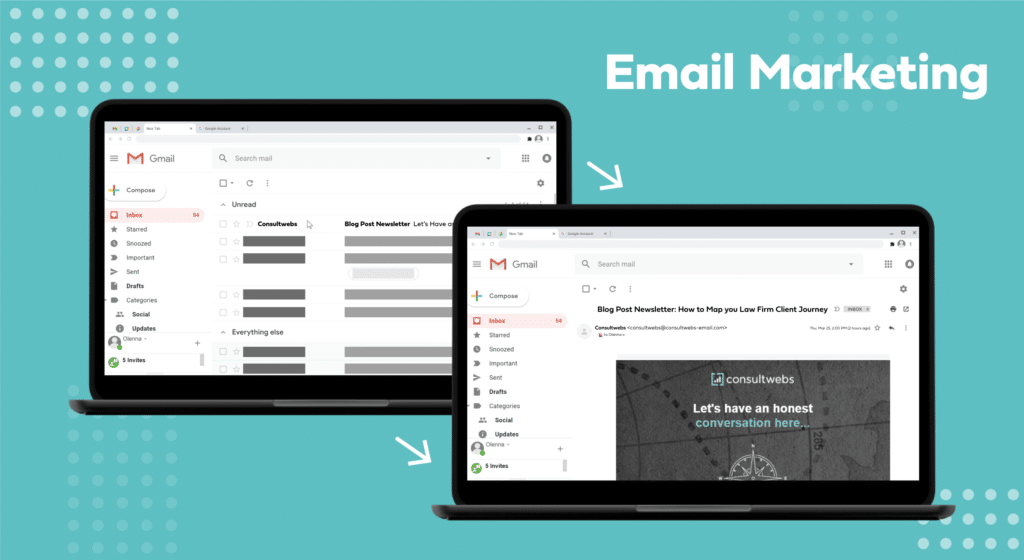
Now that you understand the basics of email marketing for your law firm, you’re probably excited to dive in. Here’s a quick guide on how to create the perfect legal email marketing campaign:
- Build your Mailing List – before you send out your first email, you need a list of people to send it to! Start by collecting emails from your current clients, and place a sign-up form on your website. As people sign up, you can begin to categorize them into groups within your email marketing platform. This makes it easy to send different communications to different groups. For example, you may want to group your audience into current clients, leads, and colleagues. You can send all groups your monthly newsletter, but you may only want to send educational emails to leads. This way, your communications will feel more customized and personal.
- Choose a Design – an eye-catching design can draw in readers and get them interested in what you have to say. Design templates should always stay consistent with your branding. Make sure they appear correctly on both computers and mobile devices, so your templates look stunning on any device your customers use.
- Write your email – you can grab content from your blog or simply put together a short message from your team. Include images when applicable and make sure the content you offer your constituents is helpful, educational, and engaging. Be sure to include links back to your website to drive traffic.
- Review and Share – before you send out any communication, it can be helpful to have a second (or third) set of eyes look it over. Mistakes will make you seem unprofessional, so proofread carefully.
- A/B Test – one of the most important things you can do is A/B test your email marketing campaigns. When A/B testing, you send out two slightly different emails to two different groups to see which gets a better response. For example, you may try sending out a campaign from two different recipients or with two different titles to see which one more people open. This can help you build an effective formula for crafting the perfect email.
- Create a Landing Page – landing pages are essential to make your marketing efforts more effective. A landing page is a page on your website designed with a specific purpose in mind. For example, include a link at the bottom of your email that prompts them to “learn more,” or “talk to an attorney today.” These links send visitors to landing pages, where they’re given more information and prompted to take an action. When you tell people clearly what step they need to take next, and you make it easy for them to do, they are more likely to do it.
- Send Out your Email – once your email and landing pages are ready to go, it’s time to hit send! Give your campaign a few days to make sure that everyone who wants to read it was able to.
- Resend – within your email marketing platform, keep a list of people who didn’t open your message. Wait at least a week and then resend it to leads that didn’t open your first message. Include a different subject line to see if that increases your chances of getting them to open it.
- Measure Results – after your audience has had time to read your email, measure your results. What’s the open rate? What links did readers click most often? Did any of your emails bounce? These stats will show you how people are engaging with your emails, what is working, and what isn’t having your desired effects.
Email marketing Ideas for Lawyers
6 Types of Emails Every Law Firm Should Send
Unlock the full potential of your firm’s email marketing strategy and start building stronger relationships with clients by using the 6 types of emails every law firm should be sending out:
-
Welcome Emails
The first type of email that every law firm should send is a welcome email. This is the first point of contact with a new subscriber, and it’s essential to make a good impression. Welcome emails should be brief and include an introduction to the law firm and a call to action that encourages the subscriber to learn more about the firm. They are crucial for building relationships, communicating the firm’s value, providing a clear call to action, setting expectations, and building trust and credibility.
-
Nurturing Sequence for Lead Magnets
Lead magnets are a great way to generate new business, and email is an effective way to nurture those leads. A lead magnet nurturing sequence is a series of emails sent to new subscribers over time to convert them into clients. By providing valuable information about the firm and its services, the nurturing sequence helps to build trust and credibility with leads, making them more likely to convert. Nurturing sequences for lead magnets are also cost-effective, targeted, automated, and measurable.Note: A lead magnet is something you give someone in exchange for their email address, like a free guide or ebook, a webinar, or a consultation. It is a way to get people interested in what you offer and get them to give you their contact information so you can follow up with them in the future. It is a way to attract people who are interested in your expertise and want to learn more.
-
Blog Post Emails
Blog post emails are a way for law firms to keep their subscribers engaged and informed about the latest developments in the legal industry. They allow the firm to position itself as a thought leader in their area of expertise and can help drive traffic to the firm’s website, leading to new leads and clients. Blog post emails also showcase the firm’s knowledge and skills while communicating consistently with the audience.
-
Curated Emails
Curated emails allow law firms to provide value to their subscribers without creating new content. They keep subscribers informed about the latest developments and relevant information from the legal industry and position the firm as a resource for legal information. Curated emails help to keep communication consistent and exciting, encouraging engagement and reducing the chances of unsubscribing.
-
Newsletter Emails
Newsletter emails are a way for law firms to keep their subscribers informed about the latest developments and updates from the firm. They also allow sharing of client success stories, testimonials, and upcoming events. This helps to build trust and credibility with subscribers. Additionally, newsletter emails encourage engagement and create anticipation among the audience, which can lead to higher engagement.
-
Asking Emails
Asking emails are designed to elicit a specific response from the subscriber, such as scheduling a consultation or signing up for a webinar. They include a clear call to action that is easy to follow and create an opportunity for the law firm to promote its services while encouraging the next step in the relationship with the firm. Asking emails are also easy to track and measure, which can help optimize future campaigns.
Email marketing Strategy Compliance – Checklist Included!
Did you know that there are email rules and regulations all businesses need to follow?
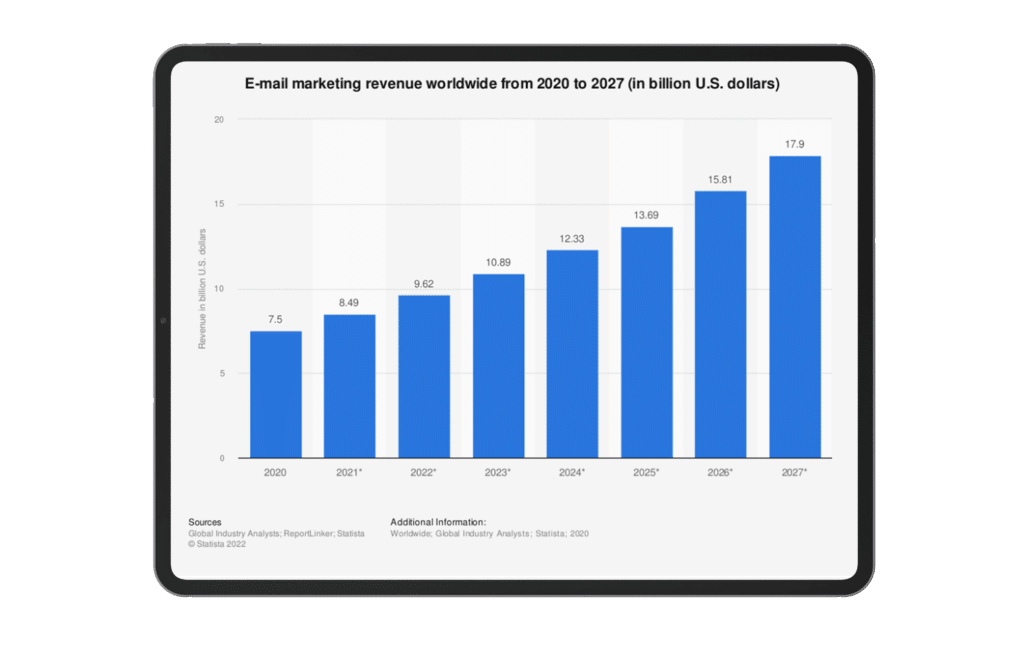
- Email marketing revenue is expected to increase to $17.9 billion by 2027, so knowing the rules can keep businesses from making costly mistakes.
- All companies in the US leveraging an email marketing strategy must adhere to the CAN-SPAM act.
- Businesses that are non-compliant with the act are subject to fines up to $46,517!
With the rapid rise of social media, you may be thinking email marketing is dead, but that’s far from the truth! According to Statista, there are already 4 billion daily email users, and by 2025 the number is expected to increase to 4.6 billion.
Studies show that most of our inboxes are full of promotional emails:
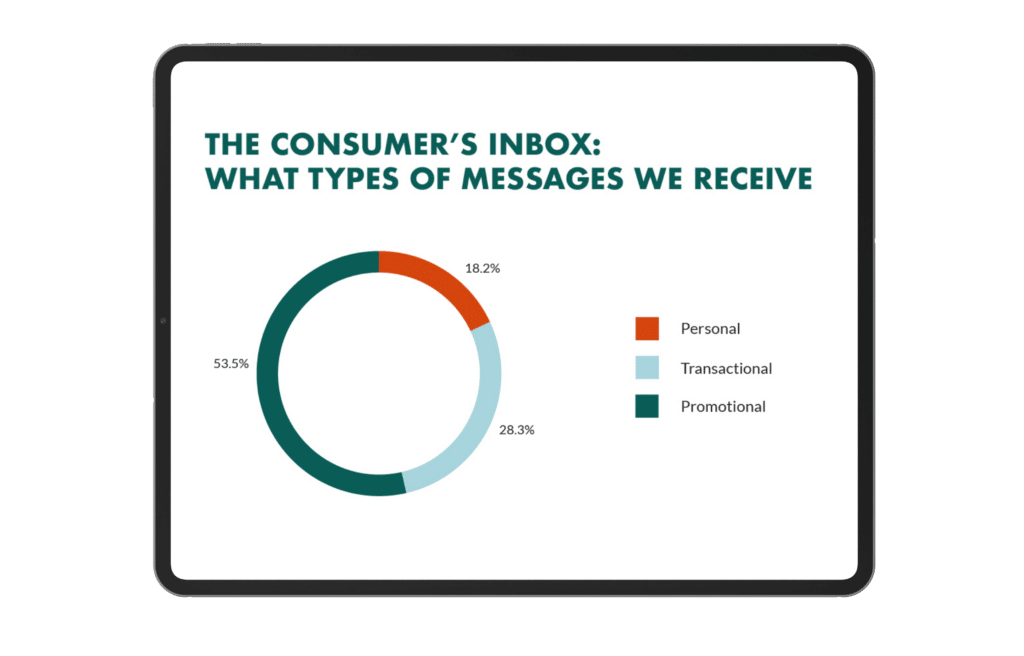
For this reason, the CAN-SPAM Act protects users like you and me against spam and unwanted emails.
Firms leveraging or looking to leverage an email marketing strategy need to know about this regulation because those that don’t comply are subject to steep fines of up to $46,517! Yes, $46,517.
You can avoid that by staying informed.
The CAN-SPAM Act
The Controlling the Assault of Non-Solicited Pornography and Marketing Act, CAN-SPAM act, was signed into law by President George W. Bush on December 16, 2003, and it established the first ground rules for all commercial emails in the US.
- Similarly, Europe has the GDPR (General Data Protection Regulation), and Canada has the CASL (Canada Anti-Spam Law).
Here are the 7 rules all your commercial emails need to follow:
- Don’t use false or misleading header information. Your “From,” “To,” “Reply-To,” and routing information must be accurate. The user must be able to identify the business that initiated the message.
- Don’t use deceptive subject lines. The subject line must accurately reflect your message.
- Identify the message as an ad. Businesses must disclose if a message is an advertisement.
- Tell recipients where you’re located. Your message needs to include a valid postal address – this could be your current street address or private mailbox registered with a commercial mail receiving agency.
- Tell recipients how to opt-out of receiving future emails from you. This is very important. Your message must include clear explanations of how the recipient can opt-out of receiving your emails in the future.
- Honor opt-out requests promptly. If you receive any opt-out requests, you must be able to process them for at least 30 days after the message was sent out and honor the opt-out request within 10 business days.
- Once a user has told you they don’t want to receive any more messages from you, you cannot sell or transfer the email address. The only legal way to transfer these addresses is if you hire a company, e.g., a legal marketing agency, to take care of your email addresses.
- Monitor what others are doing on your behalf. Remember, if you hire another company to handle your email marketing, you are still legally responsible for complying with the law. Both the third party and your law firm are lawfully accountable.
Protect Your Firm From Fines
Whether your firm or a third party is handling your email strategy, it’s critical to know how to navigate the regulations that protect all users. We’ve compiled a FREE easy-to-follow email anatomy pager to help you implement some email best practices.👇
Download Your NEW Email Anatomy Strategy
FAQ About Email Marketing
Are you ready to start using email marketing for your law firm, or do you still have questions about how email marketing can help you attract more clients? Here are answers to some of the most frequently asked questions:
Across all industries, the average open rate for emails sits at about 22%, and emails from legal teams and law firms stick very closely to that open rate. That means for every 100 people you send to, 22 or those people will open your email and read what you have to say.
So is email marketing is really worth the time and effort? Here’s your proof: the average ROI for email is close to 3800%, which means that for every dollar you spend, you’ll get $38 in return.
Some people will tell you that email is dead and that no one opens emails anymore, but this couldn’t be further from the truth. In fact, most people still check their email first thing in the morning before doing anything else. Email increases client retention, and research shows it’s an even more effective marketing tactic than social media.
Email marketing is a great way to attract new clients to your law firm and get the word out about the services you offer. It’s easy to start with email marketing, and it’ll pay back in dividends, so there’s no excuse!


